Add a ticket to Apple Wallet

For easy access to your train tickets when traveling, you can add them in one click to the Apple Wallet app on iPhone.
IMPORTANT: During the night of 13 to 14 January, an update on SNCF Connect will result in the disconnection of customer accounts. To prepare for your upcoming journeys with peace of mind, remember to import your tickets into Apple Wallet or download them as a PDF. Find more information about the update in the online help section.
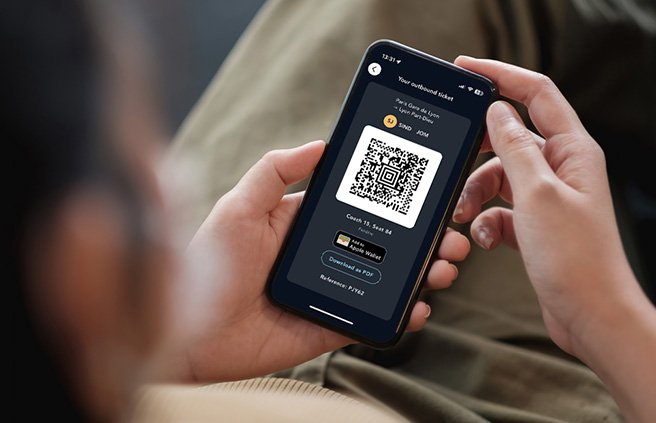
Easily find your e-tickets
Import your reservations into the Apple Wallet app on your iPhone to save time at the station gates or during checks. Find your e-ticket in just a few clicks, and also keep all your travel history in one place.
How to import your tickets
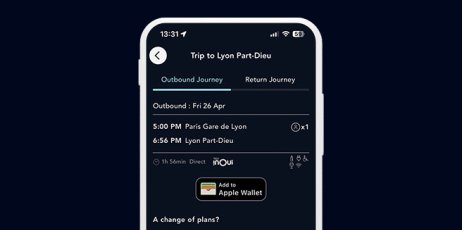
Step 1: After your booking or from the “Tickets” section, click on “Add to Apple Wallet.”
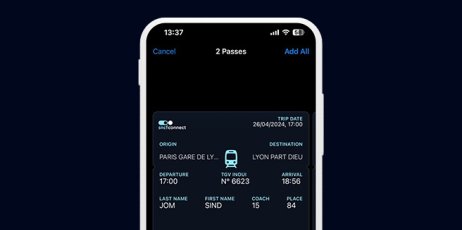
Step 2: Find your cards and train tickets in the Wallet app.
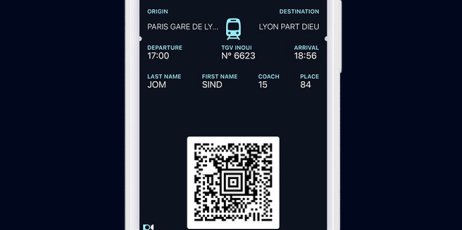
Step 3: Display the barcode of your ticket during your trip.
Tutorial: how to add an e-ticket to the Wallet app
Find in this video how to import your train tickets into the Wallet app on iPhone.
Worth knowing
- The 'Add to Apple Wallet' feature appears on your payment confirmation page, the travel details page, and the ticket details page.
- This feature applies to e-tickets for TGV INOUI, eligible TER, and Eurostar.