Add a ticket to Google Wallet

Have you just booked a train ticket? You can import it into your digital wallet application Google Wallet to easily find it during your journey.
IMPORTANT: During the night of 13 to 14 January, an update on SNCF Connect will result in the disconnection of customer accounts. To prepare for your upcoming journeys with peace of mind, remember to import your tickets into Google Wallet or download them as a PDF. Find more information about the update in the online help section.
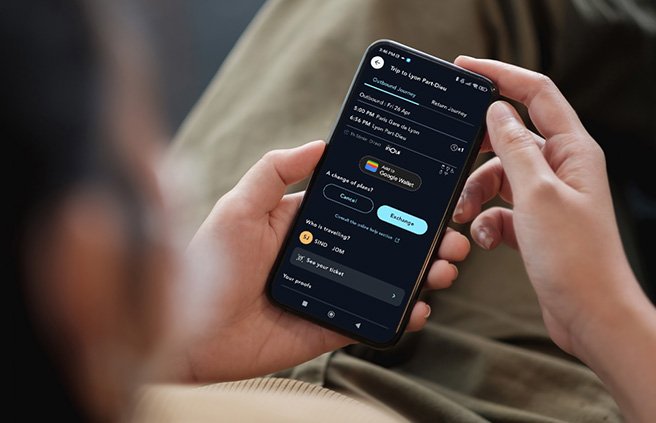
Your reservations accessible in a few clicks
From the SNCF Connect website or app (on Android phones), you can save your e-ticket in Google Wallet to easily find it during your trip. In one click, you will have easy access to your train ticket and useful information before and during your journey: date and time of the trip, QR code, train number, your seat number, etc. You can also find the history of your journeys there. It's quick, convenient, and secure!
How to importing your e-tickets
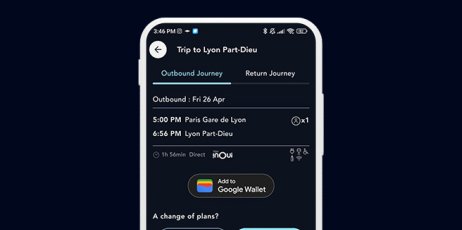
Step 1: At the end of your booking or in the “Tickets” section, select “Add to Google Wallet”, then on the confirmation screen, click “Add”.
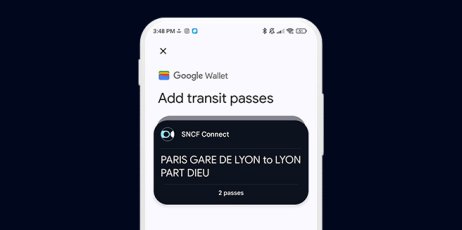
Step 2: Find your imported e-tickets in Google Wallet.
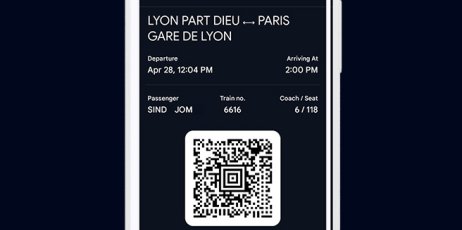
Step 3: Display the QR code of your ticket during your journey.
Worth knowing
- The 'Add to Google Wallet' feature is available from the order confirmation page and the view details of your journey (in the 'Tickets' section)
- To use the feature, you must have previously downloaded the Google Wallet app on your Android smartphone, associated a Gmail account with your Google Wallet, and be logged in at the time of adding your ticket.
- You can import into Google Wallet your e-tickets from all train companies (TGV INOUI, eligible TER, Eurostar...) except for OUIGO.