
Key takeaways
Now, on compatible Android devices, you can pay for your tickets and transport passes using the Google Pay feature. Simpler, faster and more secure than paying by card.
last update
How does it work?
This feature is available on the SNCF Connect app and website only if you're eligible for Google Pay. To be eligible, you must meet the following conditions:
- Have an Android device compatible with Google Pay.
- Have at least one valid, eligible card already added to the Google Wallet app
Payment with Google Pay is available with no minimum amount for all train companies, as well as all bundled offers that include services other than those provided by SNCF:
- Urban journeys
- ZOU! offers
- Flixbus
- BlaBlaCar Bus
- Insurance
- Un Rien C'est Tout donation
Pay with Google Pay
-
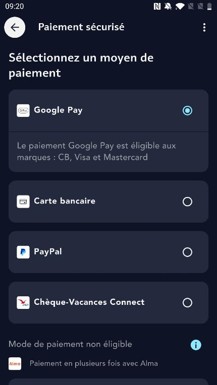
Choose your journey
At the payment step, select Google Pay
-
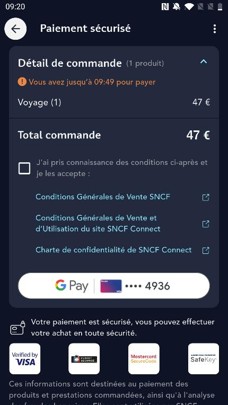
Summary before purchase
Click the G Pay button after reviewing the terms and conditions of sale
-
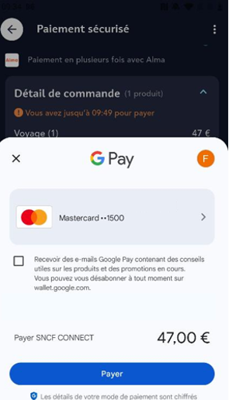
Payment confirmation
Click the "Pay" button to confirm your purchase with Google Pay
Good to know
American Express is not currently available for payment with Google Pay.
Questions/Answers
-
If the ticket is cancelled, the refund is credited back to the card used at the time of purchase.
If exchanging for a higher fare, payment with Google Pay will not be offered.
The exchange must be carried out using another payment method.
-
At the time of the transaction, Google creates another unique card number linked to the phone, so your card number is not displayed in the transaction details on the order confirmation and cancellation email.
The refund is indeed made to the card used for payment.
Leave a comment